Accessible telehealth: prepare the appointment, communication and backup plan
An accessible telehealth appointment is one in which the patient can reach the service, communicate effectively and understand what happens next. A video platform with captions is helpful only if the patient can find the invitation, join the call and use those captions during the actual consultation.
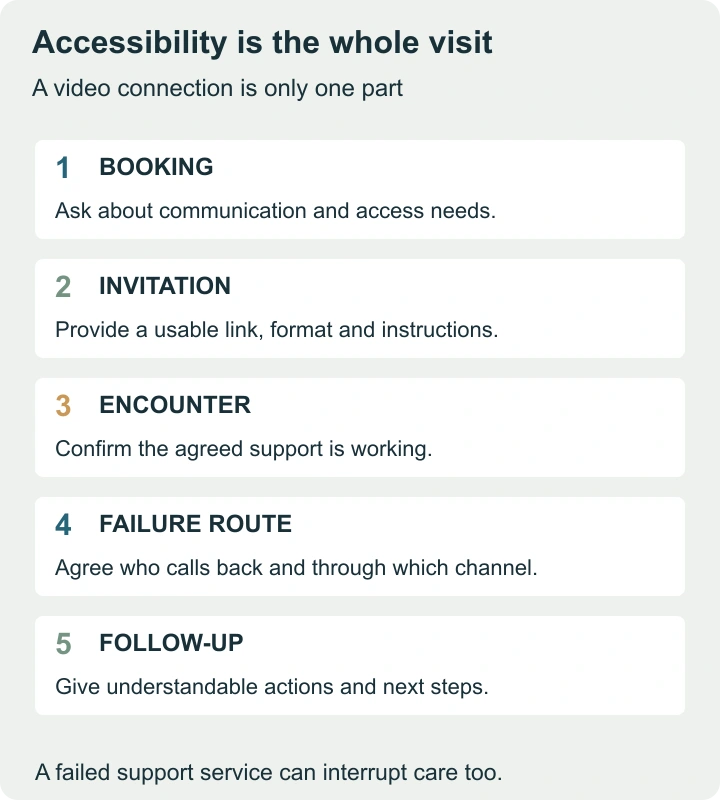
The following plan draws on US HHS patient guidance and adds practical examples for patients and service teams. The clinician must determine whether remote care is suitable for the medical task. An emergency requires the appropriate emergency service, not repeated attempts to reconnect to a routine appointment.
Ask for support while the visit is being arranged
Describe the task that is difficult: hearing speech, reading the invitation, using a keyboard, understanding written instructions, speaking through an interpreter or finding a private place. This gives the service something specific to prepare.
HHS identifies options including real-time captioning, qualified sign-language interpretation, screen-reader compatibility, relay services and extra time. These supports are not interchangeable. Captions may help one person while another needs an interpreter who can participate properly in the call.
A sample request is: “I need live captions and written joining instructions I can read with my screen reader. Please confirm that these will work in my appointment and explain the backup if the connection fails.” Adapt the request to your needs, and use a verified service channel for personal information.
Make the invitation answer the practical questions
| Item | Useful detail | Common failure |
|---|---|---|
| Date and time | Full date, local time and time zone where relevant | Patient and clinician interpret the time differently |
| Joining method | A descriptive link or clear sequence, including account requirements | Several unexplained links compete for attention |
| Communication support | What has been confirmed and who arranges it | A booking note is mistaken for a completed arrangement |
| Help joining | A verified contact and when it is available | The only help route is inside the unusable platform |
| Failure plan | Whether to reconnect, wait for a call or contact the service | Everyone waits for someone else |
- For service teams, test an invitation with someone unfamiliar with the process.
- Ask them to explain the next step without coaching.
- If they cannot find it, revise the wording or sequence.
That is a useful usability test, but it does not replace testing with assistive technology and people with relevant access needs.
Test the support, not just the camera
HHS recommends checking the technology before the appointment. Include the features the patient will actually depend on. A camera test that ignores captions or keyboard navigation can report success while leaving the main barrier untouched.
Consider a fictional patient who uses a sign-language interpreter. The test should establish whether the interpreter can join from a different location, whether the patient can keep the interpreter visible and how the clinician will manage turns in conversation. If the view changes whenever someone speaks, the patient may lose the information they need even though the video stream remains connected.
Another patient may use a screen reader and have no difficulty speaking by telephone. Their barrier may be the account-creation form or an inaccessible appointment document. The correct fix addresses that step; offering captions would not resolve it.
Agree who is present and how privacy will work
Choose the most private feasible setting and tell the service if that is difficult. A caregiver may help with the device, but assistance with technology does not automatically mean that the patient wants every health topic discussed in that person’s presence.
At the beginning, identify everyone on the call and their role. Ask how the patient would like support people involved and whether a private part of the conversation is needed. For an interpreter, make the communication arrangement clear and allow time for complete exchanges rather than speaking over the interpretation.
If a service asks for forms, photographs or documents, confirm the intended secure route. Do not send sensitive health information to an unverified address simply because a message appears to mention the appointment. The service should explain how to submit what it actually needs.
Write a backup plan that the patient can use
A backup plan should identify who acts and when. “We will reconnect if needed” leaves too much ambiguity. A more usable plan might say that the clinician will call the confirmed number if the call drops, subject to the service’s actual procedure and the clinical suitability of telephone communication.
| Failure | Question to resolve in advance | What must not be assumed |
|---|---|---|
| Video connection fails | Who calls whom, and at which confirmed number? | That a telephone visit is always medically sufficient |
| Interpreter drops out | How will communication support be restored? | That the appointment should continue without effective communication |
| Patient cannot access the invitation | Which outside help channel is available? | That another identical email solves the problem |
| A physical examination is needed | How will the next clinical step be arranged? | That remote access replaces every in-person need |
Do not require patients to repeat the same failed sequence indefinitely. A useful failure route changes something: another supported format, staff assistance, a clinically appropriate alternative or a rearranged visit with the necessary support in place.
Check understanding during the conversation
Speak to the patient rather than only to the person helping them. Allow pauses for interpretation, captions or assistive communication. If a term or instruction is unclear, restate it in plain language and check the meaning together.
A patient can prepare a short list of priorities: the main concern, what has changed and the questions they need answered. If the time is limited, identify the most important item first. An accessible conversation also needs enough time to use the agreed communication method; adding support without adjusting the pace may still leave someone behind.
The appointment continues through the written next steps
Before the call ends, confirm the plan in a format the patient can access. That may include what was decided, any agreed next appointment, how prescriptions or referrals will be handled and whom to contact for clarification. The clinician should provide any symptom-specific escalation instructions; this guide cannot supply them for an unknown condition.
Ask the patient to describe the next step in their own words as a check on the explanation, not as an examination of the patient. “I will wait for the referral call, and contact this team if it does not arrive by the agreed date” reveals a usable plan. A vague “yes, I understand” may not.
Measure barriers across the whole visit
For a constructed service review, imagine 100 bookings, 90 successful joins and 78 visits completed with the agreed communication support. The join rate is 90%; supported completion is 78% of bookings, or about 86.7% of successful joins. Both denominators matter. Counting only completed calls hides the people who could not enter.
Use those stages to locate problems rather than blame patients. Collect specific feedback: which instruction failed, whether captions worked, whether the interpreter remained visible and whether follow-up was readable. A service improves access when it fixes the failing step and checks the result with the people who need that support.